On August 20, GitLab released version 19.3. It adds MCP commands for finding and reading merge requests, a generator that turns a written instruction into an agent flow, and bulk vulnerability handling. GitLab Duo can now resolve a conflict or review comment itself: change the source branch, create a commit and close the discussion.
Previously, a developer could copy a chatbot answer and decide whether to apply it. Some GitLab features now write changes to a branch themselves. Before enabling them, a team must check more than answer quality: which projects the agent can read, where it may commit and who must approve the result.
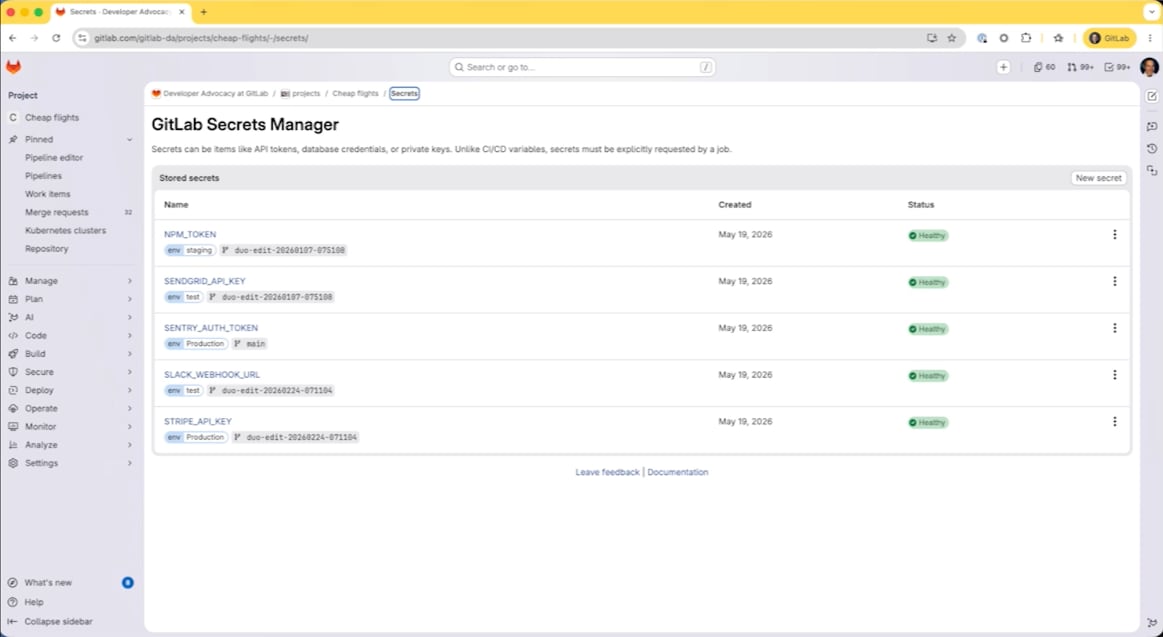
Build-time secrets are a separate product, not a new variable
In the GitLab 19.3 release notes, Secrets Manager scopes access to a job by environment, branch and branch protection, while creation, updates and reads are recorded in the audit log. That can reduce the risk of an over-scoped CI/CD variable.
It is not a standard feature for every GitLab installation. On GitLab.com it is in Limited Availability for Premium and Ultimate, sold as an add-on and billed through GitLab Credits. Self-Managed is not listed. A migration decision therefore needs plan, region, billing and emergency-access checks, not only a variable syntax change.
| Mechanism | Access boundary | Operational question |
|---|---|---|
| CI/CD variable | Depends on protection, environment and variable settings. | Who can reveal it, and which jobs receive it? |
| Secrets Manager | A secret is issued to a job according to environment and branch. | How are operations billed, where is the audit log, and what happens during an outage? |
| External vault | Defined by a separate policy system and GitLab authentication method. | Who maintains the integration and restores access? |
Secrets Manager does not automatically make an external Vault or cloud store obsolete. Its advantage is one permissions and audit model inside GitLab; the price of that simplicity is dependence on the same platform’s availability and billing. Regulated deployments must still check data location, log export and key rotation.
Plain language creates a flow definition; it does not approve it
Flow Creator takes a conversational description and returns runnable YAML for the AI Catalog. It can explain concepts and help debug a flow, lowering the entry barrier for someone who understands a release or approval process but not the Flow Registry schema.
The result is still executable configuration. It needs code-like review: available tools, branches, human approvals and partial-failure behavior. Natural language changes how the file is produced; it does not move accountability away from the process owner.
The Flow Creator documentation says the agent understands Flow Registry components, triggers, inputs and routing, and consults live framework documentation before answering. That reduces stale templates; it does not validate business policy. The agent cannot know whether a payment service may ship without a second approval or who may read an incident log.
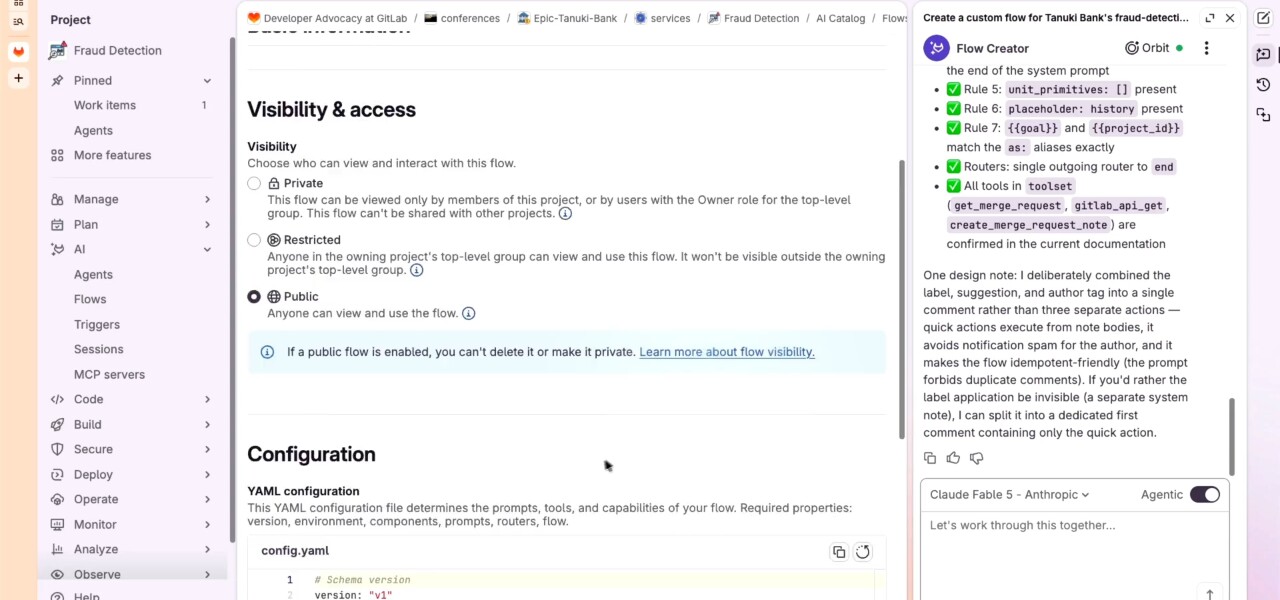
A safe pattern is to keep generated YAML in the repository, review it like any other change and begin with a trigger that cannot affect production. Write access, merge-request creation and external tools should follow only after the team has inspected actual run logs.
MCP reduces requests, not decisions
The updated get_merge_request documentation lets a client identify a merge request by URL and request diffs, commits, notes, pipelines or discussions. list_merge_requests filters by author, assignee, reviewer, state, labels and text. An agent no longer has to assemble basic context through a long chain of calls.
The documentation adds a useful qualification: associated data is selected with include, and one kind of associated data can be returned per call. “One call” on the overview page should not be read as every detail in every case. The tool removes friction; a deep review still needs more retrieval and human judgment.
MCP also has an administrative side. In 19.3, a Self-Managed administrator can disable OAuth Dynamic Client Registration, while a shared client can be pre-registered with the mcp scope. GitLab now appends the authorizing username to dynamically registered application names. These changes are less visible than search, but they help identify which agent gained project access.
The merge-request reading tools have broader availability than most agent features in this release: GitLab lists Free, Premium and Ultimate across GitLab.com, Self-Managed and Dedicated. That makes read-only MCP a sensible first trial before an agent receives branch-writing or discussion-closing rights.
Bulk remediation changes the risk queue
Teams can select multiple SAST findings, run false-positive detection and generate fixes for what remains. That is valuable when a vulnerability backlog has grown beyond one-by-one handling.
Scale also raises the cost of a bad classification. Teams need priority rules, review of generated changes and a separate path for disputed findings. Automatically closing a queue is not the same as reducing risk if a fix breaks behavior or a real flaw is dismissed.
The detailed Agentic SAST Vulnerability Resolution documentation is narrower than the release overview: bulk processing is beta, controlled by a feature flag that is disabled by default, and offered for GitLab.com and Self-Managed. Starting or canceling it requires Security Manager, Maintainer, Owner or a custom admin_vulnerability role.
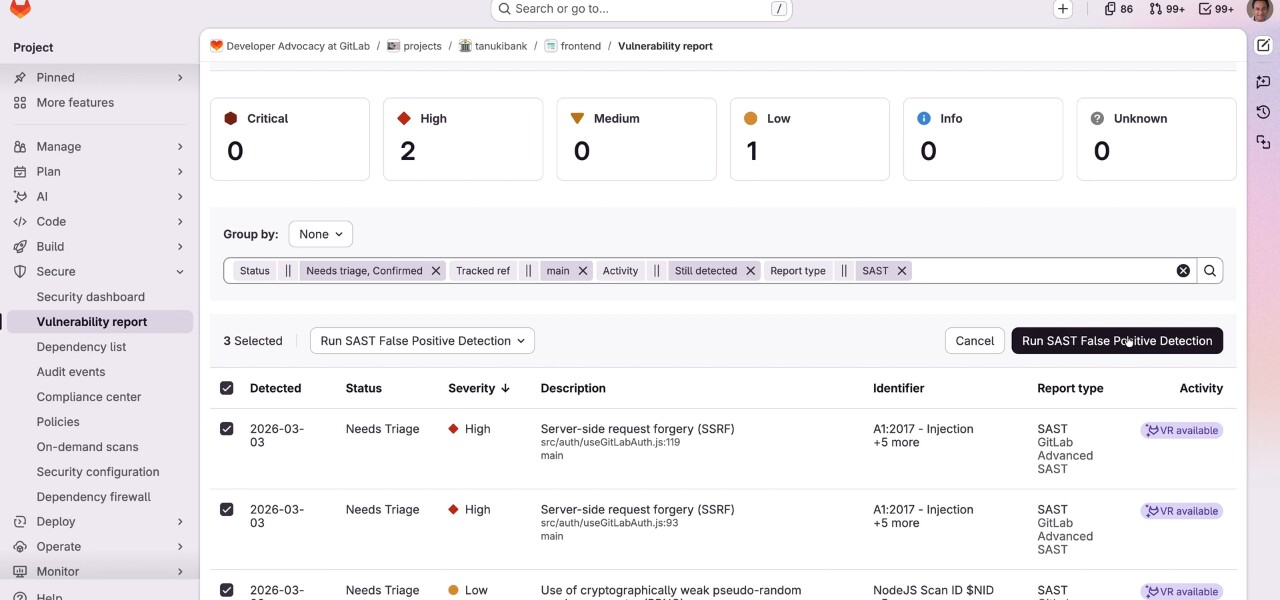
Findings are processed in order of severity: Critical, High, Medium, Low, Unknown and Info. That is reasonable queueing, but scanner severity is not business priority. A medium issue in a public payment path may deserve action before a critical finding in an unreachable experiment.
Duo no longer only advises — it changes the branch
Conflict and review-discussion resolution reached general availability for Premium and Ultimate in 19.3. GitLab Duo reads the conflict or comment, changes the source branch, commits and posts an explanation. For review comments, it also resolves the thread, though a reviewer can reopen it.
That moves the trust boundary. A chat suggestion disappears when ignored; an agent commit enters branch history. Protection must come from merge rules: required pipelines, code owners, no direct production release and a complete diff before acceptance.
A useful metric is not how many conflicts the agent closed, but how many of its changes passed review without a reopened discussion or manual repair. That acceptance rate says more about automation quality than the number of generated commits.
Start the upgrade with a permissions map
A useful 19.3 evaluation starts on a copy of one project. Choose a typical merge request, one flow and several confirmed vulnerabilities; record what the agent read, what it proposed, how many model calls it used and when a person intervened.
- Connect MCP in read-only mode first and inspect OAuth access records.
- Use Flow Creator for one flow that cannot write to a production branch, then review its YAML manually.
- Give bulk remediation a small set of previously investigated SAST findings and compare its decisions with the known result.
- Only then permit Duo to create commits, while preserving human review and merge protections.
If that trial supports adoption, the next step is a reproducible deployment with narrow roles, per-user cost limits, action logs, mandatory checks and rollback. GitLab 19.3 moves the agent closer to source code and secrets. That makes the project’s most important document not an invitation to try the feature, but a list of what the agent must never be allowed to do.