MiniMax H3 divides video creation into two computational stages. The base model first establishes the scene and motion at 768p; Regenerate 2K then recalculates it at high resolution. The additional work goes into surfaces, small objects and texture that occupied too few pixels in the draft.
There are two different implementations of the second stage. MiniMax provides the closed H3-Regenerate-2K service. NVIDIA has released Open-H3-Regenerate-2K for self-hosted, three-step regeneration. The open implementation also accepts drafts from other video models and supports output up to 4K.
From a scene description to video with sound
In the official MiniMax H3 system, H3-Context-IR precedes generation. It interprets text, images, audio and video, establishes their relationships and produces a structured description. It can supply missing details. This preparatory component is available through MiniMax’s service; the downloadable weights belong to the base model.
The base has two checkpoint families. FL2VA generates video from text and accepts the first frame, the last frame or both, allowing the scene’s appearance to be specified at either end of the movement. Ref2VA accepts image, video and audio references. Both families produce video together with sound.
The official second stage receives the 768p result together with the original context and creates a 2K version. The detailed description therefore remains part of processing after the draft has established the composition.
How the second pass adds detail
In Open-H3-Regenerate-2K, the source video is first encoded into a latent: the numerical representation of its frames used by the model. A separate three-dimensional convolutional network enlarges its spatial grid. The system then adds noise and recalculates the image on that larger grid in three steps.
Enlarging the grid carries over object positions, colours and motion. The subsequent generation steps draw the surfaces anew. Finally, the VAE decoder turns the numerical representation back into frames. Detail therefore appears through regeneration: fur gains individual hairs and materials gain fine texture.
The developers’ published comparison shows the same crop before and after processing. Below are the source crop of fur and spots and the corresponding Open-H3 result. This comparison belongs to the project team’s materials.
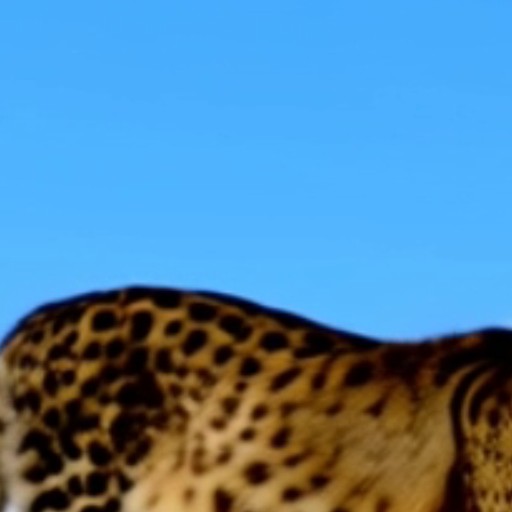
Source crop: NVIDIA / Open-H3-Regenerate-2K, Sana-assets, MIT.
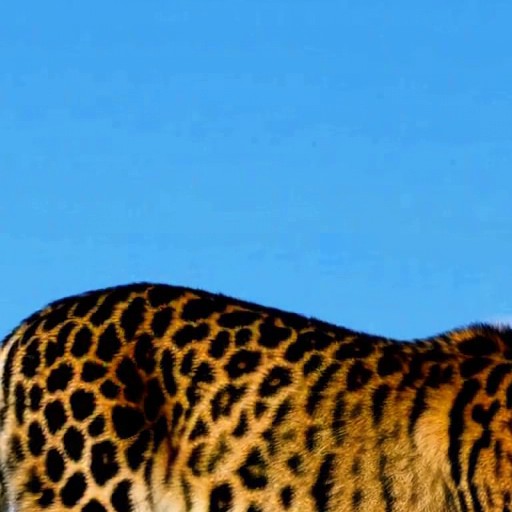
After regeneration: NVIDIA / Open-H3-Regenerate-2K, Sana-assets, MIT.
Which parts of the model change
The developers retain H3’s main weights and its VAE while training a separate LoRA adapter: a relatively small set of additional parameters. Training uses a high-quality clip paired with a degraded copy. The model learns to recover high resolution from that copy. For inference, the adapter is merged with LightX2V Turbo and LMS Sharp components.
In NVIDIA’s reference implementation, the three steps begin at a noise level of approximately 0.909. Each step calls the large model at full output resolution. The amount of added noise affects how strongly the original shapes are redrawn. It controls the reconstruction process rather than the sharpness of an already finished file.
The project publishes examples using drafts from H3, LTX-2 and SANA-Video. Scenes include a city, dancing, fencing and animals. A single pass supports clips from five to fifteen seconds, with 768p, 1080p, 2560×1440 and 3840×2160 outputs.
A local ComfyUI workflow
ComfyUI has a separate Open-H3-Regenerate extension. It connects the FL2VA base, the regeneration adapter, the latent upscaler and the decoder. Upscaling also requires the H3-Latent-Upscaler node. The base model, LoRA and decoder load as separate components.
The extension’s current examples start at noise level 0.8 to stay closer to the draft; NVIDIA’s original recipe starts near 0.909. The extension developer describes its own test in which stronger intervention makes a fox resemble a wolf: its coat darkens and its distinctive ear tips disappear, while layout and motion remain. The noise setting therefore also determines the freedom to redraw details.
The soundtrack is handled separately from video detail: the extension can carry the draft’s audio or encoded silence. Save Refined Latent and Load Refined Latent preserve and reopen the already calculated intermediate representation, frame count and audio. If decoding exceeds available memory, that prepared result can be decoded separately without repeating the three steps.
The computational cost of high resolution
In the Open-H3 team’s measurements, a five-second clip goes from a 768p latent to 2560×1440 in 87.26 seconds with the standard implementation, or 22.45 seconds with SoL-Engine and the fast VAE decoder. These are warm runs on one NVIDIA B200 graphics accelerator, using medians of three measurements; they include latent upscaling, three refinement steps and decoding. Generating the initial draft is outside those timings.
The accelerated path uses sparse attention, MXFP8 and CUDA graphs. According to NVIDIA’s code documentation, that configuration needs about 150 GB of memory on one accelerator. It describes server hardware; a local extension’s time and memory depend on its own computation and decoding path.
The two-stage workflow keeps the source draft and refined latent separate. The first stage establishes composition and motion; the second redraws surfaces. A latent saved after regeneration can be decoded separately, making the production of finished frames an independent stage of work.