On a Mac screen, an agent reads pull requests through the GitHub CLI, works through the changes and produces a summary. In a neighbouring demonstration, it builds a small app in Xcode and fixes a bug in an existing project. Apple presents these scenes in its MLX session as work that stays on the computer: the model and agent run on the Mac, while the network is used only where a tool calls it.
Behind that demonstration is a more prosaic programme. Across six WWDC AI sessions, Apple separates an agentic feature into its parts: where a model runs, how it keeps the thread of work, who checks its calls, and why text from a calendar or a feed must not become a command on its own. We reviewed the recordings and checked this account against local transcripts.
A local agent is a loop, not a chat window
Apple’s MLX session separates chat from an agent. In chat, a person runs commands or edits files after a response. An agent sends a task to a model, calls tools, observes their results and continues until the work is complete.
The Mac stack has four layers: MLX handles computation, Metal and memory; MLX-LM runs models; MLX-LM Server exposes an OpenAI-compatible local HTTP interface; and an agent such as OpenCode or Xcode sits above it. Apple demonstrates an agent reading GitHub pull requests through the GitHub CLI and producing a summary.
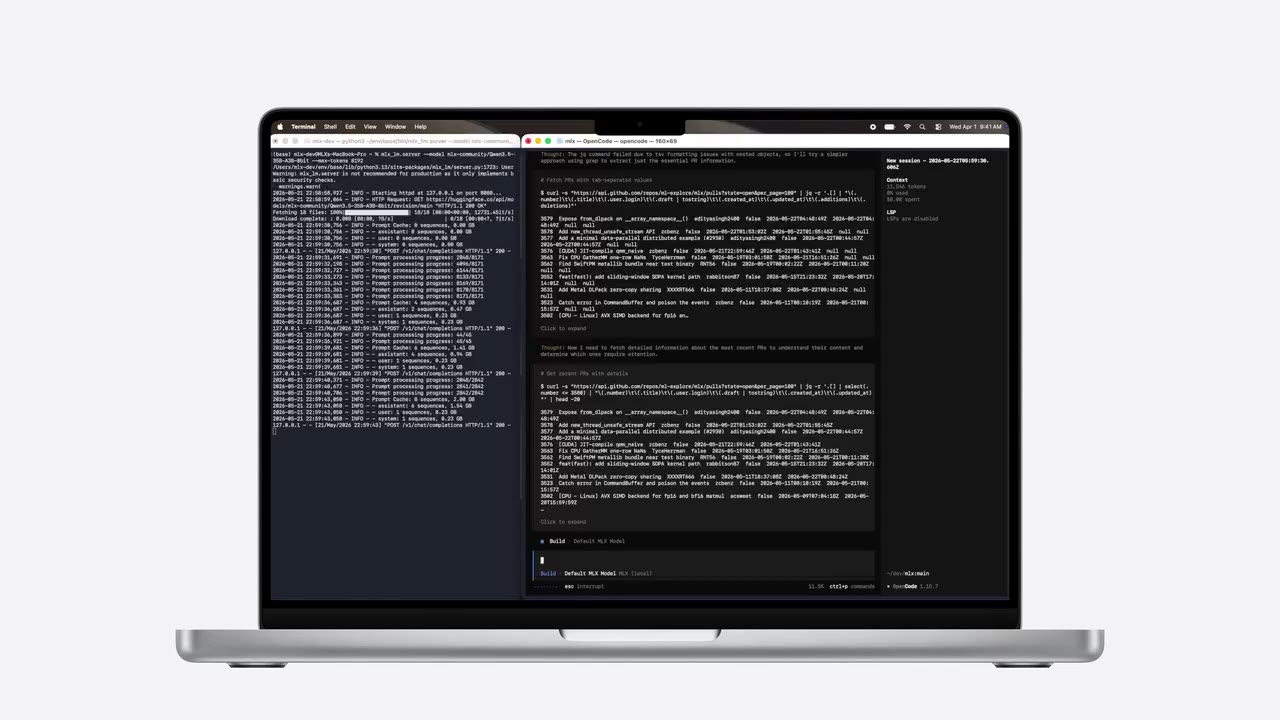
The setup shown is concrete: install MLX-LM, start a server with a model that supports tool calling, then point the agent at that local endpoint. Xcode adds it as a Locally Hosted provider, using port 8080 in the demonstration. It is an ordinary local HTTP service, not an invisible system integration.
The first demonstration also marks the limit of the word local. The model reads code and decides what to do on the Mac, but GitHub CLI still reaches GitHub for pull-request data. Local inference keeps the repository and intermediate model work away from a remote model provider; it does not remove the network needs of the tools the agent calls.
The second demonstration begins with almost nothing on screen but an empty project. OpenCode inspects the folders, writes SwiftUI files, runs a build, encounters a compiler error and returns to the code. A drawing app appears in the simulator; after a brief request, the ends of its stroke change shape. The final example begins with an already broken Xcode project. The model searches around the error and proposes a repair. The moment when the program comes alive is brief: git, the compiler and the simulator immediately check the result.
The performance discussion follows the same loop. Tool output repeatedly enlarges the context the model must read before choosing another action. Apple says M5 Neural Accelerators make matrix multiplication four times faster than M4 and connects that to almost the same improvement in prompt processing for this stack. That is Apple’s chip comparison, not a measurement of total task time.
For simultaneous agents, MLX-LM Server uses continuous batching so new requests can join work already in progress. For a model too large even for one Mac with 512GB of memory, Apple shows weights split across Macs connected through Thunderbolt or Ethernet. The company reports up to a threefold speed-up on four nodes with Thunderbolt RDMA in macOS 26.2, under the configuration presented.
Core AI and Foundation Models: several paths to a model
In “Meet Core AI”, Apple presents its on-device inference framework, from model conversion and optimisation to execution across CPU, GPU and Neural Engine, debugging and profiling. The examples include camera object recognition, image segmentation and a question about an object in a frame.
Core AI does not require a developer to take an Apple model. The talk covers importing and converting custom models, selecting one from a catalogue and defining computation at a lower level. Its profiling tools show which processing unit runs an operation and where array-layout conversions consume time.
In the visual-question example, the app takes a camera frame and gives it to a vision-language model together with a question. Core AI is the runtime for the app’s own model in this case. The developer still owns model size, memory use, first-run delay and the list of devices capable of running it.
The lower-level API exposes arrays and operations directly. The talk uses modern Swift features to keep access to model memory safe, while allowing the program to inspect the preferred layout of an array before allocation. That detail matters because an otherwise invisible layout conversion can add work between two model operations.
The Foundation Models update concerns another layer. Apple says the framework and part of the new APIs are becoming open source. The shared interface can use an on-device system model, Private Cloud Compute Language Model, Core AI Language Model or MLX Language Model. Apple describes the cloud model shown as having a 32,000-token context window and reasoning.
Foundation Models also adds system tools based on Spotlight and Vision Framework. They expose defined search and image-analysis operations rather than arbitrary device control. A separate open-source Utilities package is intended to carry newer building blocks between operating-system releases.
Private Cloud Compute is selected explicitly rather than appearing as an invisible extension of local inference. Apple says it requires no separate user account and uses it to bring Foundation Models to watchOS, where the large model does not live on the watch. A common API therefore does not make the execution paths identical: one runs on the device, another sends the request to Apple infrastructure.
The updated on-device model adds image input as well as improved logic and tool calling, according to Apple. Spotlight tools can search indexed material and Vision tools can inspect images, but the model receives only the operations the application declares. The framework supplies the protocol; the app determines the actual reach.
Dynamic Profiles change the session configuration
The session on agentic experiences defines a Dynamic Profile as a configuration inside a model session: instructions, selected model, available tools and history handling. Apple connects it to context limits, different capability needs and the desire to separate roles instead of building one unbounded agent.
In the journal-app demonstration, one profile handles a creative task while another saves a result through a tool. A profile is evaluated again before each prompt, so current application state can determine which tool is available. That also means a state change can alter the model’s powers while the conversation history stays the same.
History can be summarised, old tool exchanges removed, or a narrow task handed to a short-lived “phone-a-friend” session. A tool request and its result form a pair; dropping one side leaves a misleading history. Utilities supplies transformations, but the application still decides which evidence may be discarded.
The boundary between profiles is the useful part. One step may run locally with read-only data, another use a more capable model for a creative task, and a third expose only the saving tool. Profiles do not prove the app is safe, but they avoid giving every step the same permissions and execution cost.
The demonstration also makes context management explicit. Long sessions do not preserve everything without cost: old technical exchanges can be dropped, earlier conversation can be condensed, or a narrow task can be moved into a new session. Apple treats the model’s context window as a resource the developer must actively manage.
A “phone-a-friend” call uses tool calling to create a short-lived session with a separate profile. Its answer returns to the main session as a tool result. The main model does not acquire all of the secondary profile’s tools; it receives the bounded result of that one delegated question.
Evaluate the answer and the actions
The Evaluations session uses Xcode 27 to test model-backed features. Its BookTracker example assigns tags from written reviews. A few tidy samples can make the feature look finished: the prose is short, the tone obvious and the genres easy to separate. Real readers write differently — loosely, ambiguously and sometimes about several things at once. The awkward review needs to appear in a test before it appears for the first time in front of a user.
A generator creates structured samples under stated diversity conditions. Apple shows different sampling strategies, including seeking rarer cases rather than filling the set with near-duplicates. The generated rows are then validated: required fields, allowed values and duplicate checks can be enforced with ordinary code.
Where exact matching cannot express quality, the framework can use a model as judge. The talk still requires criteria and a validation set with human answers. Without that comparison, one model would merely confirm another model’s output.
For an agent, the final text is not enough. It can name the right book after consulting an unnecessary source, choosing the wrong tool or repeating an action. Trajectory expectations check tool choice, arguments, order and stopping conditions. The demonstration tests the calls for finding a book and adding it to a collection directly.
Synthetic generation is presented as an iterative loop rather than a one-button dataset. The team starts with examples, generates candidates, rejects malformed or repetitive rows and then inspects how the expanded set changes evaluation results. The useful output is the reviewed dataset, not the raw generation count.
Tool evaluation can also include dynamic conditions. A search call may be acceptable only before a matching book has been found; an add call may require a particular identifier returned by search. That lets the test describe causal dependence between calls rather than merely checking that two function names appeared somewhere in a trace.
External text must not become a command
Apple’s security session examines indirect prompt injection. A calendar invitation or feed post can enter model context with a hidden instruction. If an agent has a tool with side effects, it may be steered toward deletion, disclosure or another action the user never requested.
The talk separates influence on the model from the resulting real action. A strange answer is one symptom; a function that publishes a post, transfers money, controls a device or deletes data is a different class of consequence. The proposed protection sits at the transition between the two.
In a calendar, the threat looks almost harmless: a meeting title, a time and a few lines of description. One line can remain someone else’s text to a person while sounding like an order to the model. If the agent can publish a post or delete a file, the attack tries to cross that short distance from a sentence it read to an action in the world. Apple therefore proposes retaining provenance: an invitation remains untrusted even when it sits beside the account owner’s request.
Application code can redact sensitive values, replace them with placeholders, constrain tool arguments and request confirmation. A handler intercepts each tool call before execution, allowing code to permit or deny a concrete action independently of the model output.
Confirmation needs to name the operation and object. A generic Continue button tells the user little; the intercepted call provides the tool name and arguments, allowing the interface to say which post will be published or which file will be deleted.
The talk does not call every measure absolute protection: visually or structurally marking untrusted context remains probabilistic. But the rule for tool calls is firmer. Authority to act stays with application code and the user rather than arriving through external text inside a prompt.
The examples are deliberately ordinary: a public post, a calendar, a photo deletion without undo, or private information passed into a tool. Their shared risk is a chain from untrusted text to a function that changes something outside the conversation. A sentence telling the model to ignore hostile instructions cannot replace inspection at that boundary.
Redaction changes the architecture rather than merely the prompt. A sensitive value is replaced before model input, while trusted application code retains the real value and can use it after approval. The model may decide that an operation is needed, but it never receives the secret that could be copied into a response or smuggled through another call.
The application makes the last decision
Across these six sessions, Apple does not assemble a single all-knowing assistant. It shows the parts from which a developer builds a feature: choosing a local or cloud model, limiting history, declaring tools, testing the sequence of actions, and requiring confirmation before an irreversible operation.
The decisive boundary therefore lies less between a Mac and the cloud than between text and authority. A calendar invitation may contain words a model understands, but permission to delete a photograph, change a record or send a message remains with application code and the person in front of the screen.